 Cosmic Player
Astrology · iPhone
The sky keeps moving. This stops it when it reaches you.
Planetary motion, animated day by day. When a planet forms an angle to one in your birth chart, the motion halts, the pair connects, and you read what it means.
Free to download · Full access is sold as an auto-renewing subscription
How it works
Three steps, and the sky does the rest.
Your chart
Birth date, time and place, entered once. That chart becomes the reference everything is measured against.
Press play
Planets advance day by day. You choose which pairs and which angles are worth stopping for, or keep the defaults.
Read the figure
A transit forms, the motion stops, the planets connect. Swipe between figures to read them one by one.
Features
What is inside.
Forecast with no horizon
Run the motion as far forward as you like. The forecast is not capped to a week or a month.
People close to you
Add other charts and see what the same transits mean in their lives, not only yours.
Planets in houses
Extended readings of what a planet in a given house means and how it shows up in life.
Vedic chart
A Vedic chart alongside the Western one, with transits, progressions and solar return.
What you actually see
So what is on the screen?
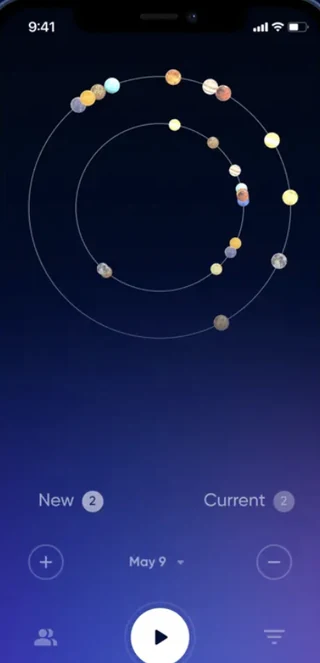
Your chart, and the sky on top of it. The dots on the rings are the planets as they are on the date shown at the bottom. Yours sit underneath, fixed from the moment you were born.
Press play and time moves. A day per beat. The two counters keep score: how many figures are new, and how many are still running.
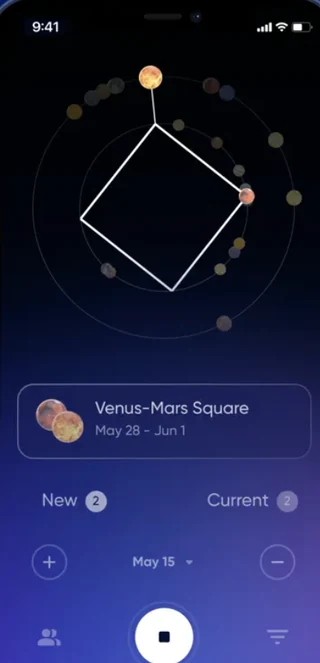
When something lines up, it stops. The planets involved are joined by a line, and the card underneath tells you which figure it is and how long it lasts.
Please read
What this app is, and what it is not.
Cosmic Player is an astrological tool for reflection and curiosity. It does not provide medical, psychological, legal or financial advice, and nothing in it replaces a professional. Interpretations are traditional astrological readings, not statements of fact about what will happen.
Subscription
What you pay, and how to stop paying.
Cosmic Player is free to download. Full access is sold as an auto-renewable subscription through your Apple Account.
Full conditions are in the Terms of Use. What data is involved is in the Privacy Policy.
Common questions
Before you start.
Do I need my exact birth time?
The closer the better. Houses and the ascendant shift with the hour, so an approximate time gives an approximate chart. The date and place alone still produce planetary positions and transits, but the house readings will be less reliable.
Will it tell me what is going to happen?
No. It shows when a transit forms against your chart and what that configuration traditionally means. That is an interpretation, not a prediction of fact, and it is not advice about health, money or legal matters.
Can I add someone else's chart?
Yes — that is what the people-close-to-you feature is for. Only add someone if they know and agree, since you are entering their birth details.
How do I delete my account and my data?
In the app: Settings → Account → Delete Account. That removes your charts and the details you entered. You can also write to privacy@cosmic-player.com. Deleting the account does not cancel a subscription — that is done in your Apple Account.
What does the app track?
The app asks for permission through Apple's App Tracking Transparency prompt and uses advertising identifiers for marketing measurement only if you allow it. Decline and the rest of the app works exactly the same. The Privacy Policy sets out what is collected either way.
More answers, and a person who replies, on the support page.
Press play and watch it come.
Free to download. The forecast runs as far forward as you care to look.